Generative UI: the interaction pattern between tapping and chatting

Oscar Sellhed
Business Designer

Every time AI gets smarter, someone predicts the end of tapping on screens. It hasn't happened yet, and probably won't anytime soon.
The Humane Pin tried to replace the screen entirely with an AI-first wearable. It was discontinued within a year, after selling a fraction of its projected 100,000 units. It's one of several hardware attempts that haven't become the breakout moment people expected. Tapping is still winning.
But that doesn't mean nothing is changing. Something else is quietly taking shape between tapping and chatting, and it's worth understanding before deciding where your product should place its next bet.
Tapping keeps winning
Most people would agree, if you ask them directly, that tapping is still the fastest way to get something done.
Early computer interfaces often needed written commands, where you typed out exactly what you wanted and the computer carried it out. That's not far from how many of us talk to AI today. Direct manipulation changed that. Instead of describing what you wanted, you could point to something on screen and interact with it directly. That distinction still matters now that AI agents can do more on our behalf. Delegating a task can save time, but sometimes tapping, dragging, or pinching is still the clearest way to get the result we want and stay in control. The data backs this up:
Spotify
Ran agents against human users on familiar, multi-step tasks inside the app. Completion rates came out roughly even. The agents were five times slower.
OpenAI
Shut down the Atlas browser after less than a year. Users preferred browsing the web themselves over explaining their intent to get to a page.
Starbucks
Released a ChatGPT app this April. Ordering a coffee through the existing Starbucks app takes about 20 seconds. The same order through ChatGPT took close to two minutes.
None of this means AI has no place in interaction. It clearly does. It just doesn't have the place people assumed a couple of years ago.
So where does AI actually earn its place?
AI shines on genuinely complex tasks, like planning something or pulling several sources of information together into one answer, rather than tasks you already know exactly how to do.
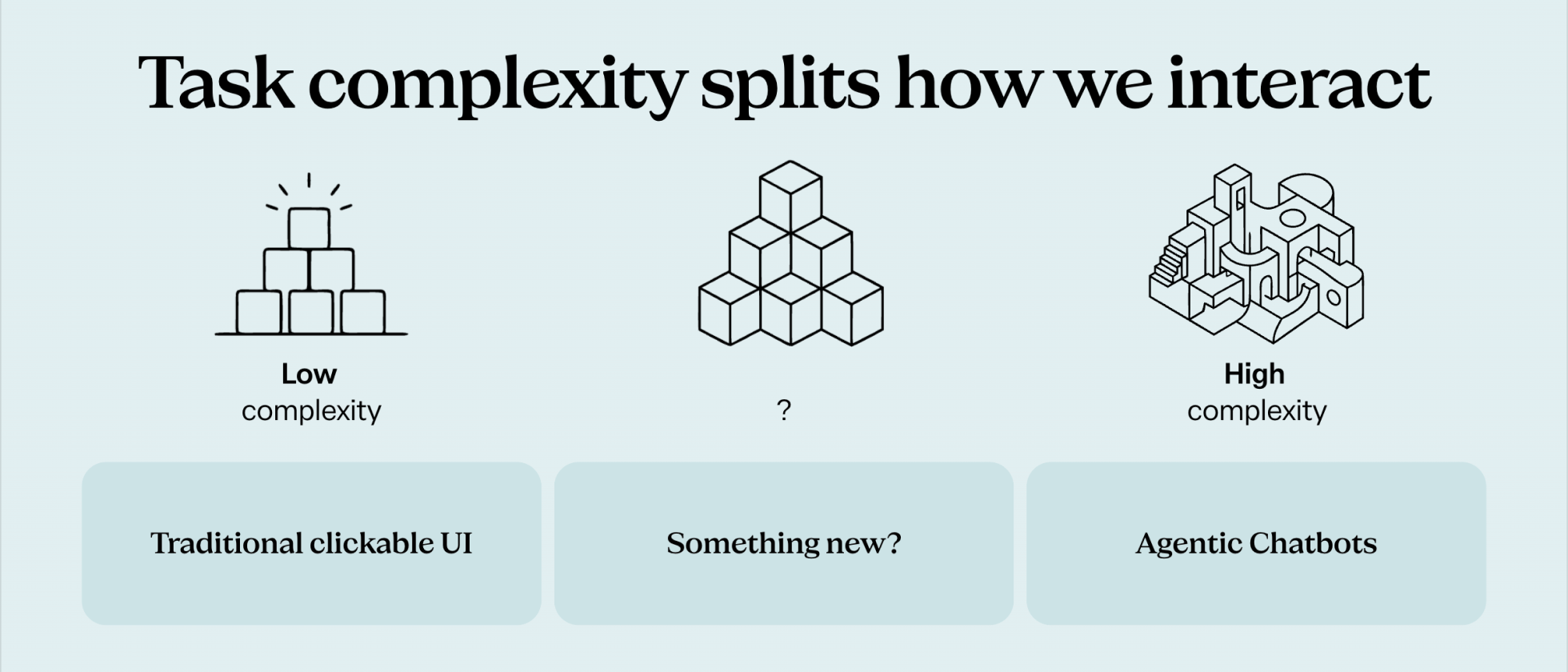
Low-complexity tasks, the ones people already know how to do, are still best served by simple tapping. It's faster to tap than to explain. High-complexity tasks are where agents and chat genuinely help, because they support working from intent rather than a known sequence of steps. What's actually interesting is what's forming in the middle.
The middle ground: generative UI
Search "pH scale" on Google today and you get the usual AI text answer, but alongside it, an interactive scale you didn't ask for by name. Ask a follow-up, say how different citrus fruits compare on that same scale, and it builds you an interactive version you can drag and explore. Google isn't just generating text anymore, it's generating the interface that carries it.
This is generative UI, or GenUI, and it's the pattern worth watching closely right now. GenUI is a layer where the AI assembles the interface while someone is actively using it, building the experience around them as they go rather than presenting a screen a designer finished in advance for every possible user. There are three levels worth knowing.
Static GenUI
A designer has already built a specific widget, a checklist for example, and the AI fills it in for you during a chat, adding items, checking things off, adjusting it as you talk. Take an app called Just Today. It turns "wash the car, clean the house, return library books, buy groceries" into a working checklist inside the chat. It's the lightest layer of GenUI, using the AI's understanding to populate something a person already designed.
Declarative GenUI
A step further. Take a landscaping app called Verdure: you upload a photo of your garden, it reads what's in the picture, asks a short series of questions about how you want the space to feel, then generates a design suggestion with a price estimate. Before this kind of interface existed, you'd have had to type all of that out yourself, in plain text. Here, the interface itself does the work of shaping your input.
Open-ended GenUI
The rarest of the three, and the most striking when it works. Someone typed a single prompt into ChatGPT: "Create a simulation of the journey of Odysseus on a map, let a ship represent him and his crew in the simulation and add an icon to each of the adventure that he faced during his travels." ChatGPT researched the actual geography, Cambridge University sources included, then generated an entire interactive map of Greece, Italy and the Mediterranean, with controls to adjust speed and explore different regions. As the ship reached each stop, a short introduction to that part of the story appeared. The whole interface, including the map, controls and narrative beats, was rendered by AI from that one prompt, nothing else.
We first noticed this trend building back in 2024. Two years later, we're standing right in the middle of it. It's changing what building a product interface even means, moving away from fixed screens toward something that takes shape as people use it.
What this means for product design
Two things stand out.
First, we're moving from fixed screens to modular building blocks. Design systems aren't new, but what's new is that AI can now take the knowledge encoded in a design system and assemble it in ways nobody explicitly designed for. Product teams build modular visual "LEGO blocks" that the AI assembles for the user, rather than shipping one fixed layout for everyone.
That shift brings real challenges. Predictable layouts are one of the best things about most products today. You learn where to tap once, and that knowledge stays useful. Brand consistency is another, because nobody fully controls what actually gets generated and rendered for a given person in a given moment.
Second, this is about building interfaces that support complex input, helping bridge the gap between low-complexity tasks and the higher-complexity ones products still need to support people through. GenUI points toward a future where people don't need to get good at prompting at all, because the interface itself does that work, the way Verdure turned a vague request into a short series of easy questions. The tradeoff is that a single, learnable interaction pattern gets harder to guarantee, since the AI assembles something fresh each time instead of the one interface everyone already knows.
The bottom line
We don't know how big this shift ends up being, or what it looks like once it settles. What we can say with confidence is that it's going to play a real role in how people interact with products going forward.
Tapping still wins for low-complexity, well-understood tasks. Don't replace what already works.
Agents and chat earn their place on genuinely complex, intent-driven tasks.
GenUI is the pattern forming in between, worth watching and prototyping now.
Product teams are shifting from fixed screens to modular blocks the AI assembles.
The most useful thing any of us can do right now isn't waiting for certainty. It's experimenting with the technology, thinking seriously about where it's heading, learning from what happens, and continuing to invest and grow with it.
Where does generative UI fit in your product?
If you're weighing where a smarter, more assembled interface could genuinely help your users, rather than chasing a new interaction pattern for its own sake, we'd be glad to think it through with you. Get in touch and we'll help you map where tapping still wins, where agents and chat earn their place, and where generative UI is worth building for.
Subscribe
Join our newsletter and stay up-to-date